

I make skills and plugins every day, and I do it on purpose. Defining a repeatable workflow is immensely valuable, and it compounds: the more of them you have, the more you can do. Claude is also very good at writing them, so the library grows quickly. The catalogue on my home server currently holds about 4,800 records across 293 plugins (no, I didn't write them all by hand, and some of them have nothing to do with code).
That only works if an agent can find the right one without being told about all of them first. Everything an agent can use has to be described to it, so a big library floods the context window before any work starts. I hit this wall with MCP tools, and when I moved towards skills, I hit it again.
The usual answer is project scope: decide that this repo needs tools A, B and C, and load only those. For a solo developer I think that's the wrong trade. I don't want to maintain a list per repository, because I might need any tool, anywhere.
So the agent should start with almost nothing, search when it needs something, and load only what matches. That's "progressive discovery", and Canopy is my attempt at making it work for skills, plugins and MCP tools together. It's a self-hosted, MIT-licensed stack that extends MCPJungle, and I cut its first releases this week. It's early (the README says so in bold), but the core works, and this post covers what it is, how it differs from the alternatives, and how to install it.
GitHub Repository danielrosehill/Canopy Self-hosted progressive discovery for AI agents: search and load skills, plugins and tools on demand. Extends MCPJungle. ★ 1PythonMITUpdated Nov 2026 View on GitHub GitHub Repository mcpjungle/MCPJungle One place to manage & connect to all your MCP servers ★ 1.6kGoMPL-2.0Updated Nov 2026 ai-agentsinfrastructuremcpmcp-gatewaymcp-registry View on GitHubWhat Canopy does
The idea behind the name: a rainforest canopy is one roof over everything beneath it. Your skills, plugins, MCP servers and command-line tools live in one place, and every agent reaches them through one connection.
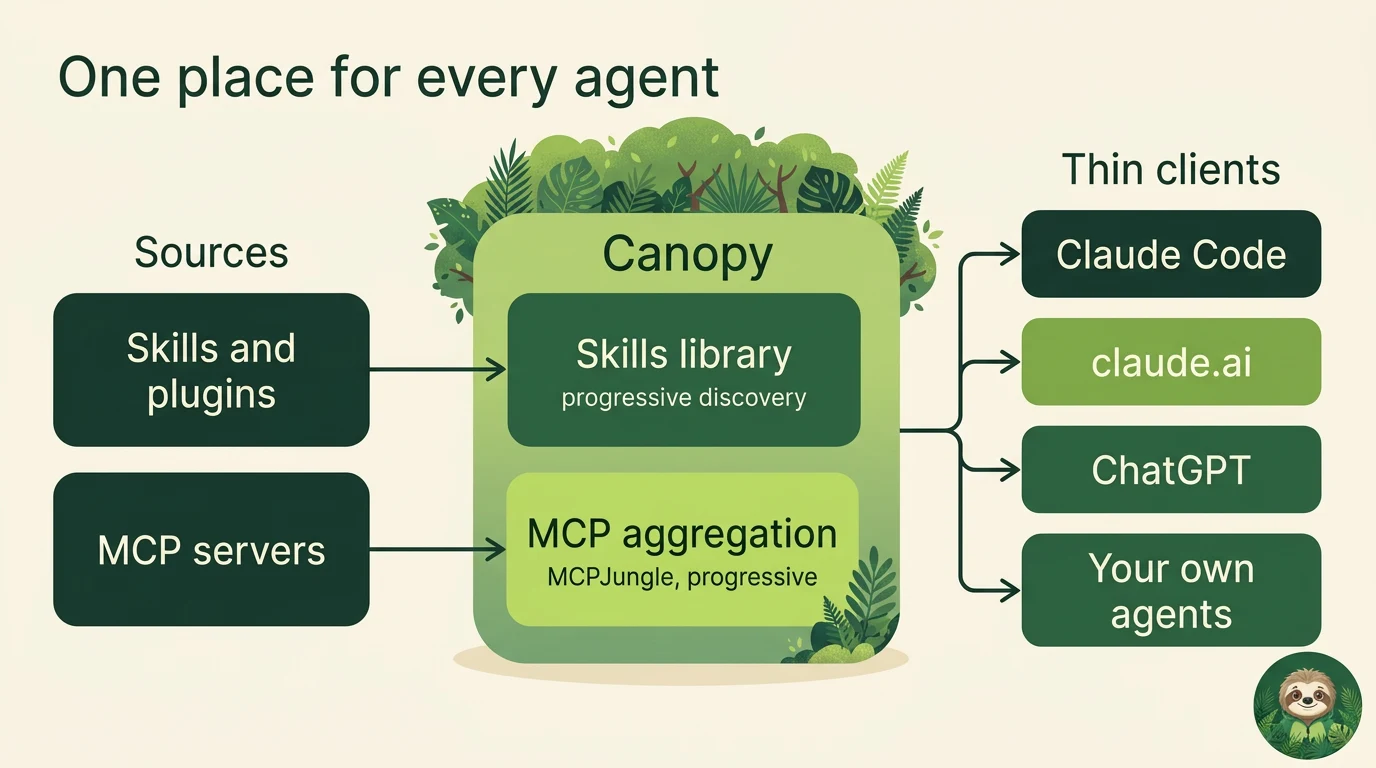
Three aims drive the design. Bundling means everything sits together (mission control for your AI setup, if you'll forgive the phrase). Thin clients means a laptop or a hosted app holds one connector and none of the credentials for your tools, so a new device is one install and a login gets renewed in one place. Context efficiency means agents load what they need, when they need it.
Canopy ships no content of its own, apart from the skills that operate it. You bring your own plugin marketplaces (which are just git repositories) and your own MCP servers.
How progressive discovery works
An agent connects to one small group of 12 tools. Two of the upstreams behind that group do the real work: the catalogue, which searches, and the toolbox, which calls anything that isn't listed.
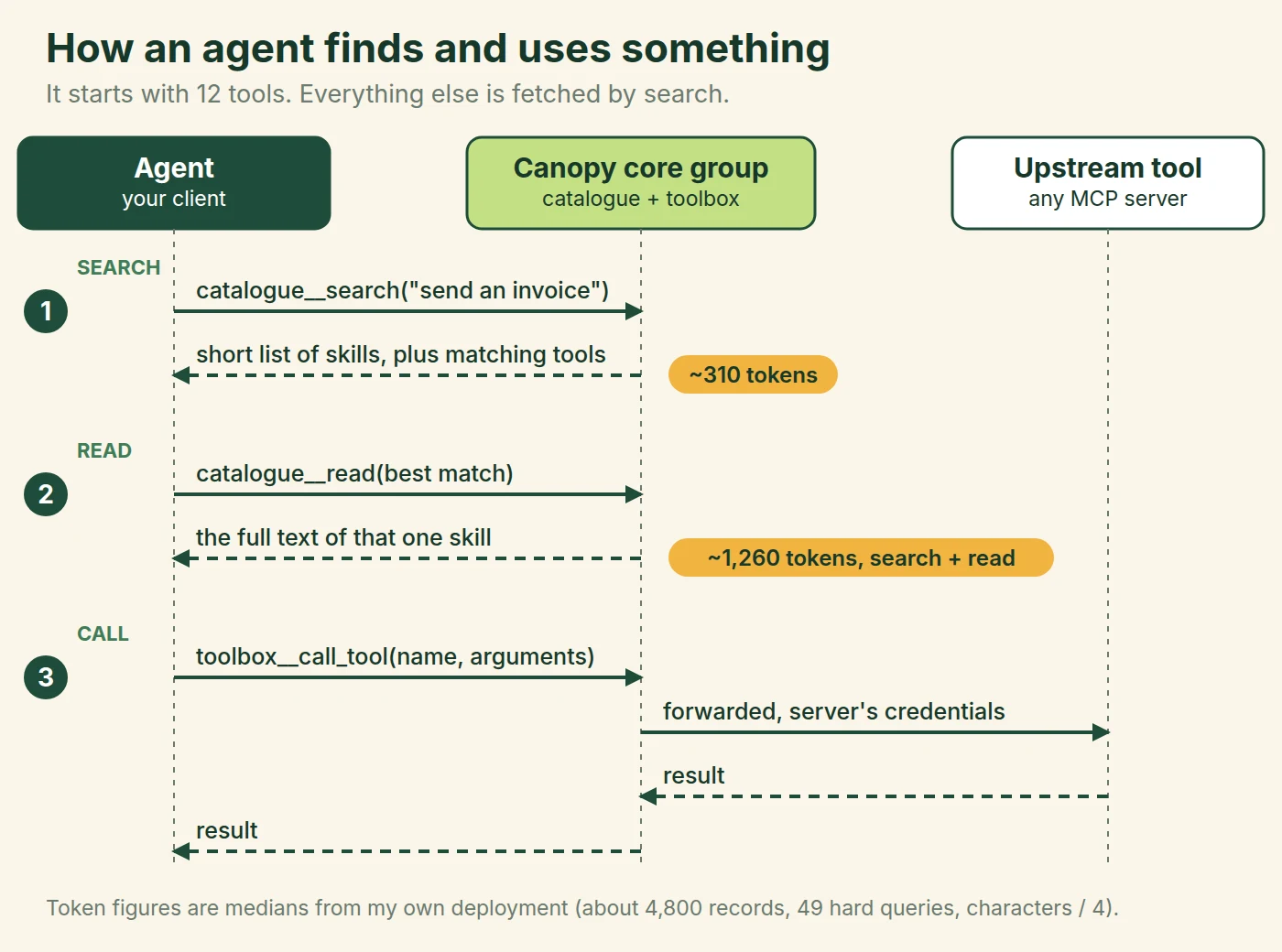
Skills aren't installed anywhere. An agent searches in plain words, reads the one skill that matches, and follows it. A skill's reference files only arrive if it asks for them, so a long document costs nothing until it's needed. If the skill names a tool the agent can't see, the call goes through the toolbox, and the gateway adds the credentials on the server side.
There's one catch: agents told to search first often don't (telling them more firmly helps less than you'd hope). So the connector plugin includes a prompt hook that searches on your behalf, on any prompt of three words or more. If the server reports a confident match, it adds up to three skill ids to the agent's context. If it doesn't, it adds nothing, so most prompts cost no tokens at all.
Search itself runs in stages, and every stage after the keyword index is an upgrade that can fail without taking the search down with it.
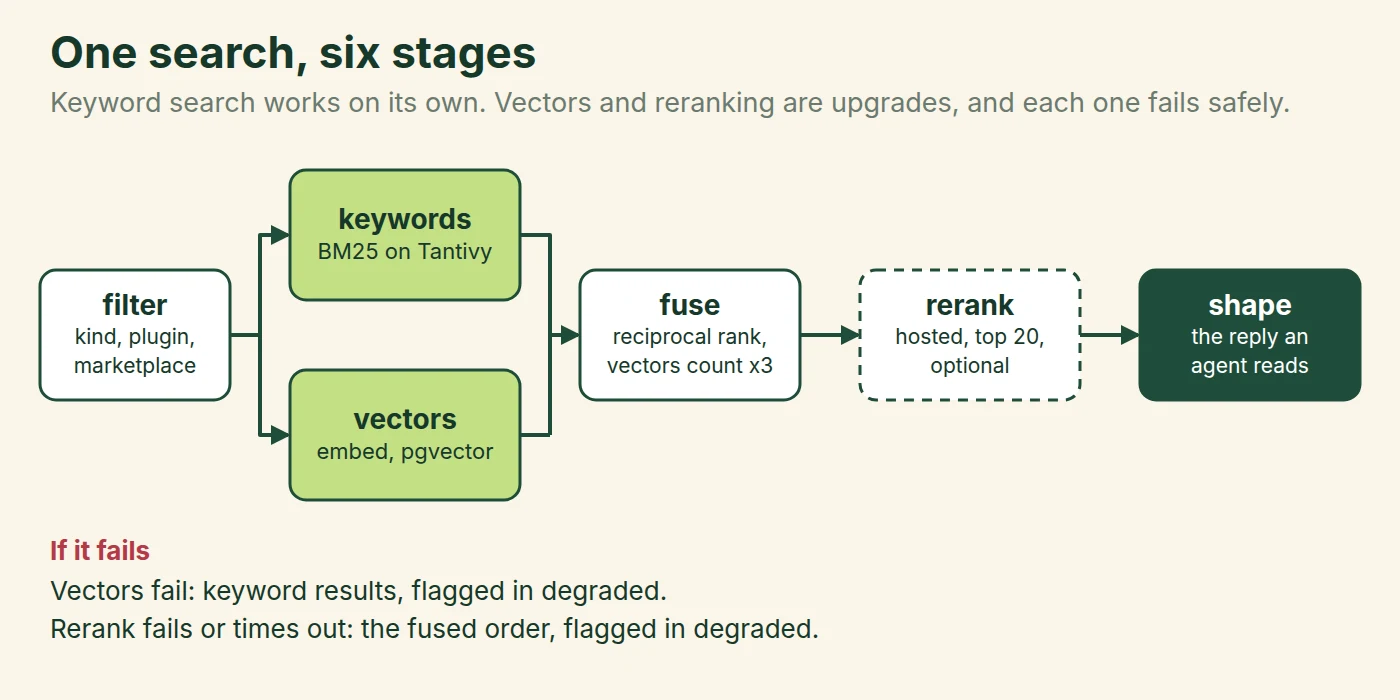
The rerank step earns its place. In a head-to-head on 81 queries, ranked-first hits went from 60 without it to 70 with it, for about 450 milliseconds a search. Numbers like that are why Canopy treats measurement as part of setup (more on that below).
How is this different from other progressive discovery tools?
Before writing this, I went back through what's out there. For MCP tools the field is well served. For skills there's much less, though it isn't nothing.
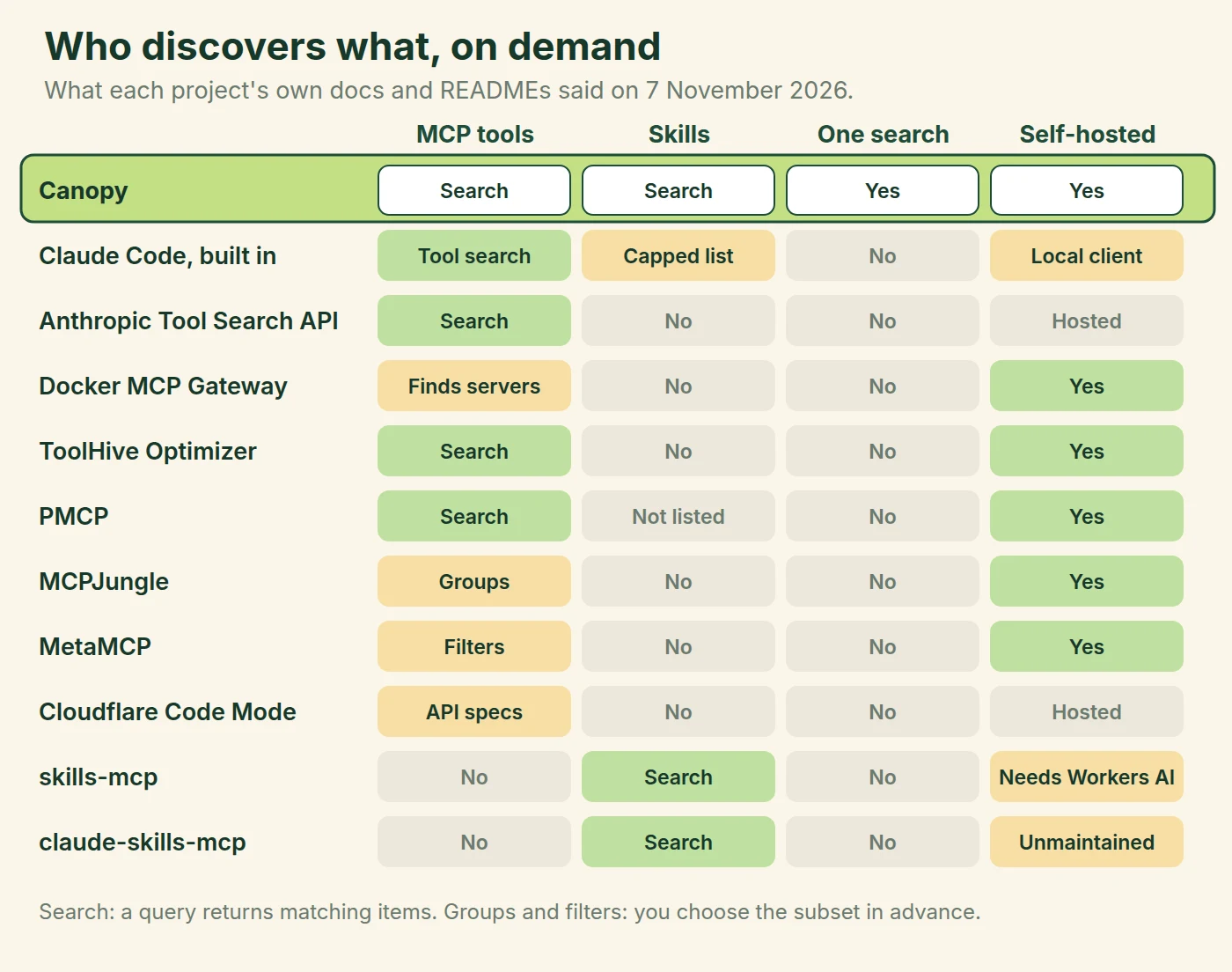
For MCP tools alone, you may not need Canopy. Claude Code now defers MCP tools behind its own tool search, and Anthropic offers the same idea through its Tool Search API, with no infrastructure to run. ToolHive's optimizer gives agents just find_tool and call_tool over a hybrid search, and PMCP does something similar with lazily started servers. Docker's MCP Gateway comes at it one level up: mcp-find and mcp-add discover servers from its catalogue and add them to the session. Cloudflare's Code Mode squeezes an entire API spec into two tools (a neat trick, though a different problem from mine).
Skills are thinner. Claude Code lists every installed skill by name, and keeps descriptions within a budget of 1% of the context window, dropping them for the skills you use least when there are too many. That's a capped list and not a search (a sensible one, for a normal number of skills), and it only covers what's installed on that machine. skills-mcp does proper three-tier semantic search over SKILL.md files, and it's the closest thing I've seen, though it depends on Cloudflare Workers AI for embeddings. claude-skills-mcp did much the same locally, and its README now says it's no longer maintained, on the reasoning that platforms support skills natively.
GitHub Repository Jignesh-Ponamwar/skills-mcp A self-hostable, open-source, semantically-searchable Agent Skills registry delivered over MCP, with a three-tier progressive disclosure architecture. ★ 11PythonApache-2.0Updated May 2026 agent-skillsai-agentsantigravityclaudeclaude-code View on GitHub GitHub Repository K-Dense-AI/claude-skills-mcp MCP server for searching and retrieving Scientific Agent Skills using vector search ★ 411PythonApache-2.0Updated Jul 2026 View on GitHubSo here's where Canopy sits. Its difference isn't that it searches, since plenty of things search. The difference is that one query returns skills, plugins and MCP tools together, ranked separately so that a large tool set can't crowd the skills out, from a server you own, across every client you connect. If a skill mentions a tool, the record knows it, so retiring a server tells you which skills would quietly break.
What it isn't, in fairness, is mature. The skills side reads only the Claude Code marketplace format today, and several projects in that table have teams behind them, where this one has me.
Home Canopy or Cloud Canopy?
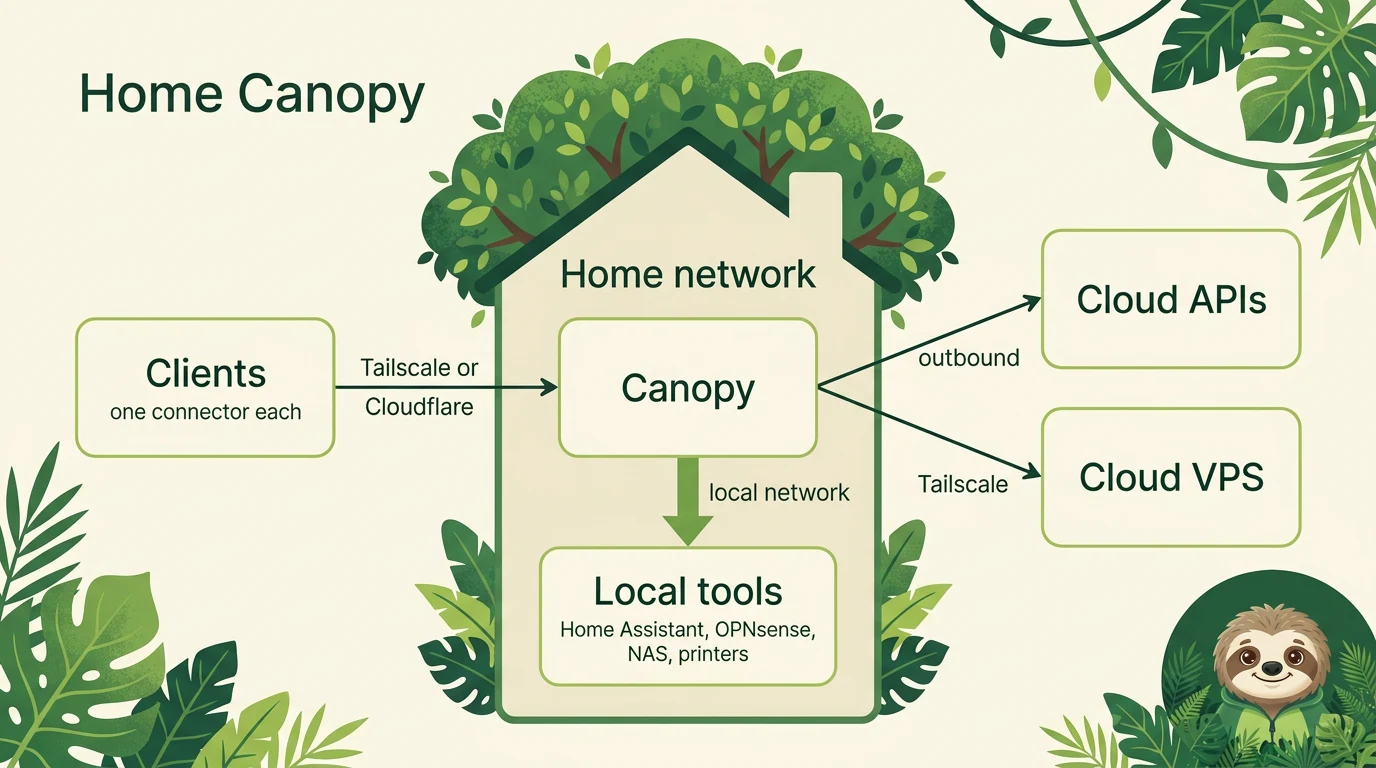
Where it runs is a separate question from what it does, and it comes down to how much of what you automate is at home. There are two templates.
Home Canopy puts the gateway on a home server. This is the deployment Canopy came from, and it's elegant if a lot of your orchestration is domestic: Home Assistant, the NAS, the router and the printers are all on the same network, and the cloud is still an outbound connection away. The cost is that if home goes offline, everything stops.
Cloud Canopy is the inverse. The gateway sits on a VPS, always up, and a small proxy at home dials out so that local tools arrive as one upstream, with no open ports. The cost is that every local action makes a round trip through the cloud.
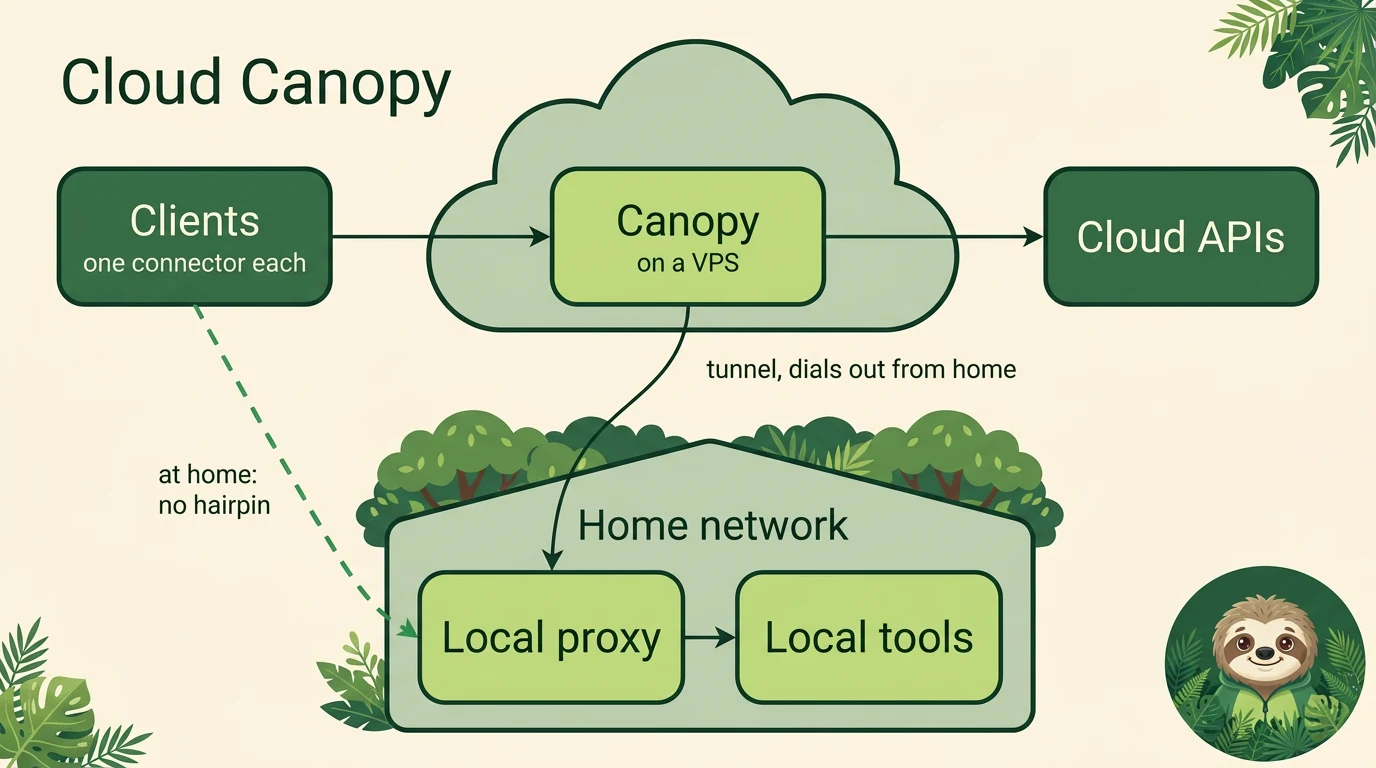
An honest caveat here: Cloud Canopy hasn't been deployed as a whole. Its main building block has (I run a small site gateway registered as a single upstream), but the template is a proposal, and the dashed "no hairpin" shortcut for clients at home is an idea that isn't built. If you want every component and connection, there are full network diagrams as posters: Home Canopy and Cloud Canopy, with print-ready A1 and A0 versions in the repository (they're designed for a wall, not a phone).
Installing Canopy
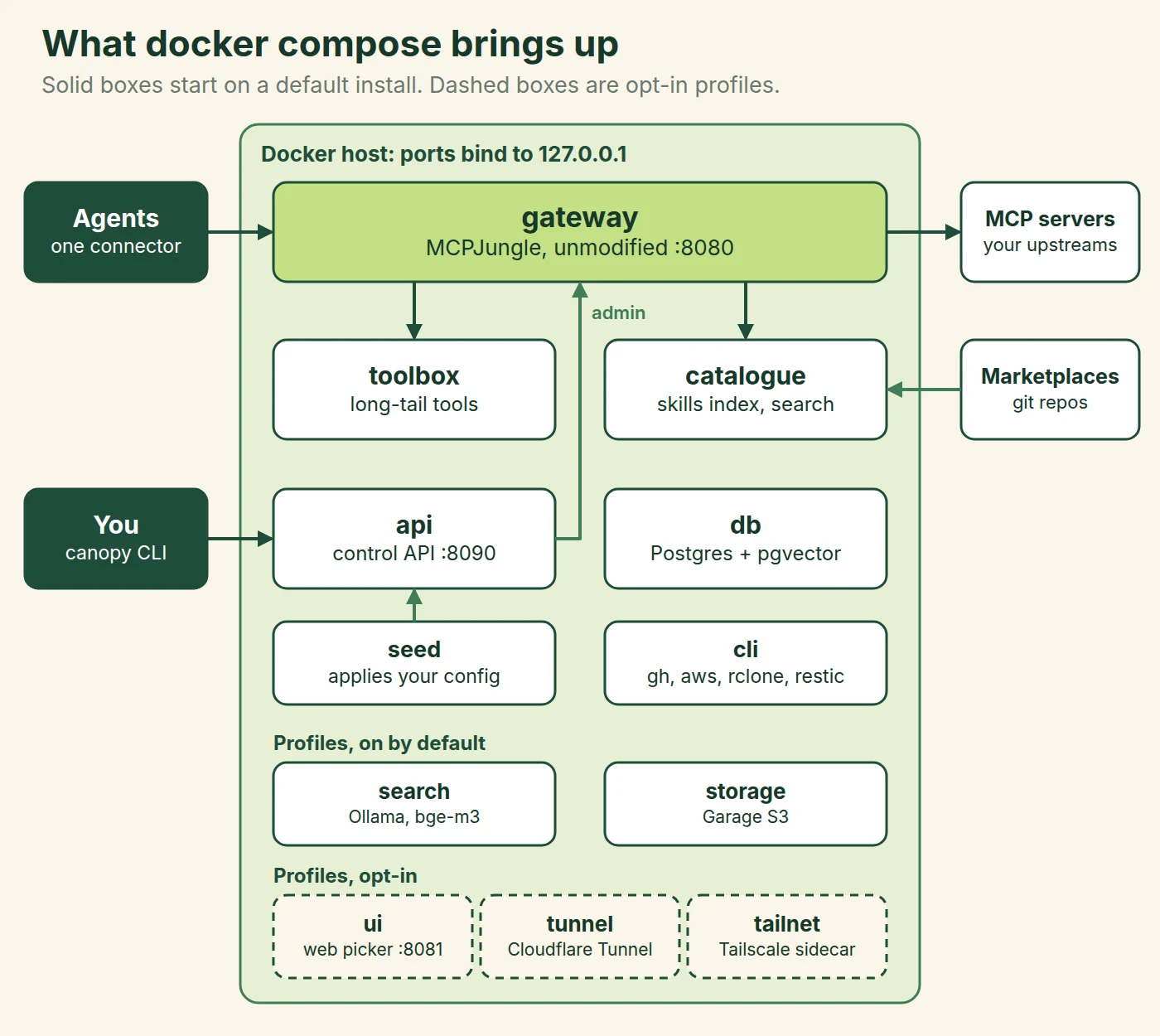
You need Docker with Compose v2. Here's what comes up.
1. Clone and initialise. This creates your two folders: ~/canopy/agent-data is yours, and ~/canopy/data is Canopy's.
git clone https://github.com/danielrosehill/Canopy.git && cd Canopy
clients/canopy init
2. Decide about local embeddings. A default install starts Ollama and runs bge-m3 on the host, which takes about 2 GB of RAM. In my test the images came to about 6 GB on disk, plus about 1.2 GB for the model. On a small machine, open ~/canopy/agent-data/secrets.env before going further, remove search from COMPOSE_PROFILES, and either remove EMBED_PROVIDER for keyword search or point it at a hosted provider (the comments in that file show how). I haven't run the keyword-only variant end to end myself, so treat that one as documented and not yet proven.
3. Start it.
clients/canopy up
clients/canopy status
up should end with seed finished with 0 problem(s). On a fresh clone it took about two minutes. Don't panic if the first status reports index is empty: the first sync is still running, and the problem clears when it finishes.
4. Connect Claude Code. Set these before you start the session:
export CANOPY_MCP_URL=http://127.0.0.1:8080/v0/groups/core/mcp
export CANOPY_TOKEN=$(clients/canopy token)
Then install the connector:
/plugin marketplace add danielrosehill/Canopy
/plugin install canopy-connector@canopy
5. Validate it. Don't skip this one. In a new session, ask your agent to validate Canopy, or run /canopy-connector:validate. It checks the connection, then finds and loads real skills and a real tool, and tells you what that cost. From my fresh install, shortened:
ok    reach the gateway  20 ms
ok    list tools (12, schemas ~2178 tokens, names ~56)  3 ms
ok    tool:catalogue__health  rank 1  63 ms  ~717 + ~143 tokens
ok    skill:canopy-manager/setup  rank 1  62 ms  ~686 + ~465 tokens
retrieval  6/6 found, 6 first
Validating and benchmarking are one skill, because a connection only counts if an agent can retrieve through it. A healthy run ends in GREEN. Run it on each device you connect, and tell it about a skill you know exists: a private one makes the better test, because a pass also proves your private plugins are indexed.
6. Add your own things. A fresh server indexes only Canopy's own plugins. List your marketplaces in config/marketplaces.json inside agent-data, list your MCP servers in config/servers.json, and keep secrets in secrets.env as ${PLACEHOLDERS}. Then:
canopy jobs run sync
canopy apply
(Link clients/canopy into your PATH to drop the prefix, as I have here.) The customising guide has the whole formula, with a working folder to copy. canopy update moves you to the newest release, and goes back by itself if the new images come up unhealthy.
Reaching it from outside
Everything binds to localhost by default, so going further is a deliberate step. Each kind of client gets its own route.
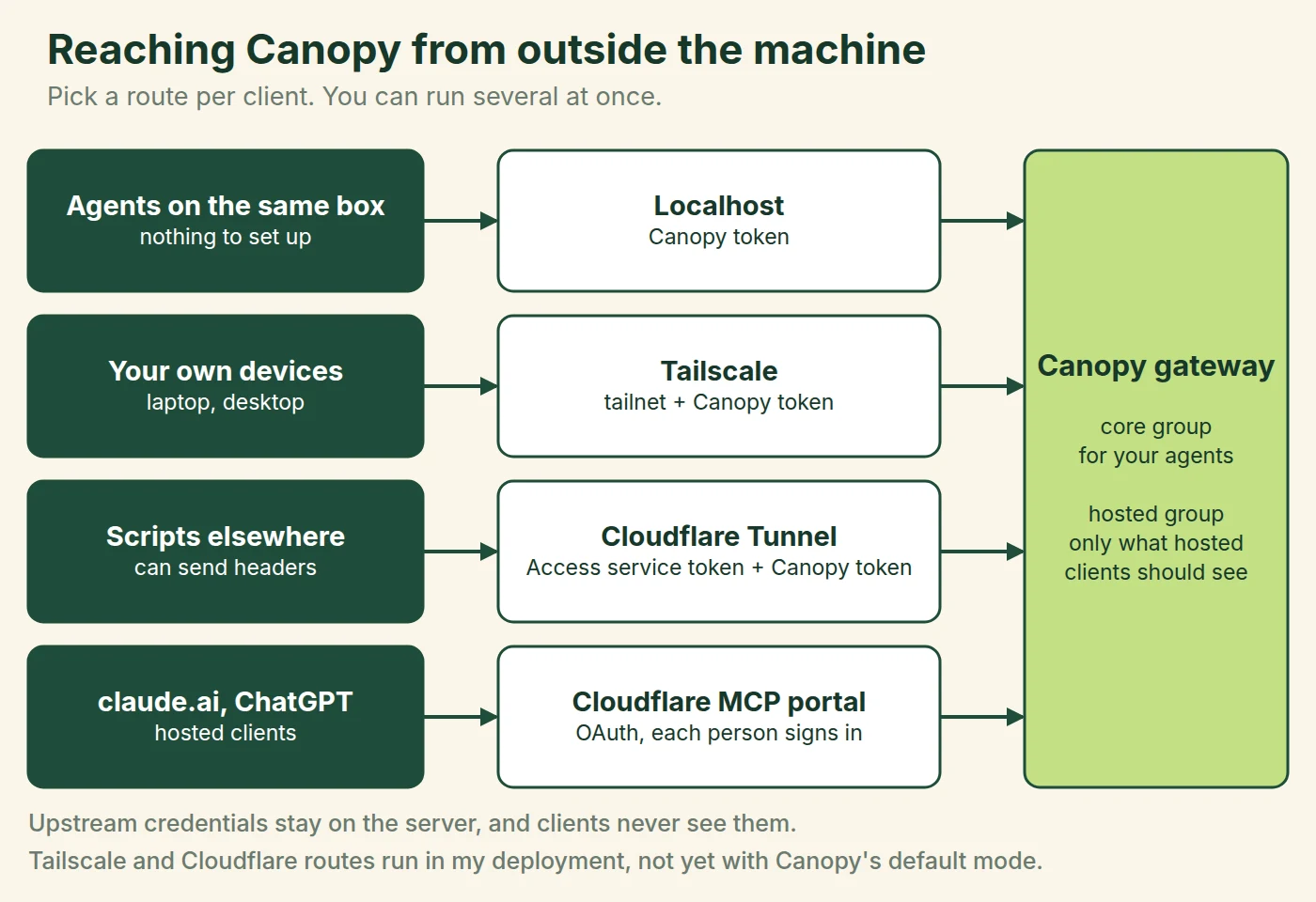
Tailscale is the right default for your own machines, because there's nothing public to attack (and it's the fastest route anyway). Hosted clients such as claude.ai and ChatGPT run in someone else's cloud, so they need an OAuth route, and each one should get a gateway group holding only what it ought to see. One trap on the Cloudflare Tunnel route: forget the Access application and you get no error at all, just a public origin (the worst kind of success). Create that first. The deployment patterns page covers each one, and these routes run in my deployment but haven't yet been run with Canopy's default enterprise mode.
How well does it work?
On my live deployment (about 4,800 records, 49 deliberately hard queries, run on 7 November), the right skill came back first 44 times and in the top three all 49 times. Median search time was 524 milliseconds. A median search reply cost 312 tokens, and finding and loading the right skill cost 1,262. Tokens here are characters divided by four, so treat them as an estimate that compares between runs rather than a true count.
Two caveats, since I'd want them if I were reading this. Those queries are mine (so they flatter me), and some descriptions were tuned after misses, so the 49 out of 49 says less about phrasing nobody has tried yet. And my own server isn't a minimal setup: it preloads 69 tools, about 24,000 tokens as full schemas. How much of that a session really pays is still an open question on my list, since Claude Code defers schemas.
What doesn't work yet
The tunnel and tailnet profiles are untested. Hosted clients are the weak spot (they were in October, too): ChatGPT offers OAuth or nothing, so Canopy's token doesn't fit there without a proxy, and skills in ChatGPT are a separate job from the MCP connection. The web UI has no login of its own. And a marketplace you add is content your agents will read and follow, so add only sources you trust.
I'm not offering this as the best way to do any of it. It's one way that works, written down so that others can take what's useful. If you've got a growing pile of skills and an agent that can't find them, the repository is public, and I'd particularly like to hear from anyone who tries Cloud Canopy, because I haven't.
