

I bought a cheap pan-tilt Wi-Fi camera on AliExpress (about ₪94, from a seller called TPTEK Official Store, listed as an "8MP 4K IP Camera WiFi") for the most boring reason possible: I wanted another feed in Frigate. It does that job fine. It speaks RTSP and ONVIF, Home Assistant picks it up, and the picture is decent for the price.
What bothered me was the phone app. The camera came with an app called IPCee, and IPCee could show me the live feed from anywhere: on mobile data, outside the house, with nothing port-forwarded on my router. If an app can reach a camera on my LAN without me opening a single port, then the camera is holding a door open to someone's server. I wanted to know whose, from where, and what goes through it.
So before blocking it I spent an afternoon watching it, and ran a Reolink E1 Pro through the same tests on the same network as a branded point of comparison. Everything below comes from one router (OPNsense), one day (3 November 2026), and packet captures I can re-read. Where something is my reading rather than something I saw, I say so.
How I watched it
Nothing exotic. Three sources, all from the router:
The pf state table for the camera's IP (OPNsense exposes it at
POST /api/diagnostics/firewall/query_states). It's a snapshot of every live flow with its NAT translation, which tells you who the camera is talking to right now.Packet captures on the LAN bridge, filtered to the camera and excluding RTSP (port 554, so my own NVR's pull doesn't drown everything). Three windows: idle, a power cycle, and a live view from my phone with Wi-Fi switched off, so the remote path got exercised.
whois on every remote IP, and the DNS names and TLS SNI read out of the captures.
One trap worth passing on: OPNsense's packet-capture "host" field silently accepted the expression <cam> and not <lan>/24, ran the job, and wrote an empty 24-byte pcap. A plain host plus the port exclusion works.
The method is packaged as agent skills in my Network Forensics plugin, and the raw findings, scores and playbook live in the IP-Cam-Lockdown repo:
The cheap camera: what it actually is
Nothing on the box or the listing names the manufacturer, so identification came from the device itself. ONVIF reports the model as IPC_GK7205V500_G5S-WQ (the GK7205V500 is a Goke SoC) and the manufacturer as, helpfully, H264. The firmware string, V5.10.R02.000889TV..., is Xiongmai's format, and the web UI wants an ActiveX plug-in from ocx.jftechws.com (JF Tech is Xiongmai's cloud brand). The Wi-Fi chip is AltoBeam. So: Xiongmai firmware on a Goke board, sold under a store brand with a third-party app. That's the usual shape of a cheap camera, and it matters, because Xiongmai's cloud and its local protocols have a long public record.
(One more small thing: the listing says 8MP, and the stream is 2880x1616, which is about 4.7 MP. That fits the 5MP variant on the same listing. Not a security finding, just a reminder that the listing isn't a spec sheet.)
Every flow the XM camera opened
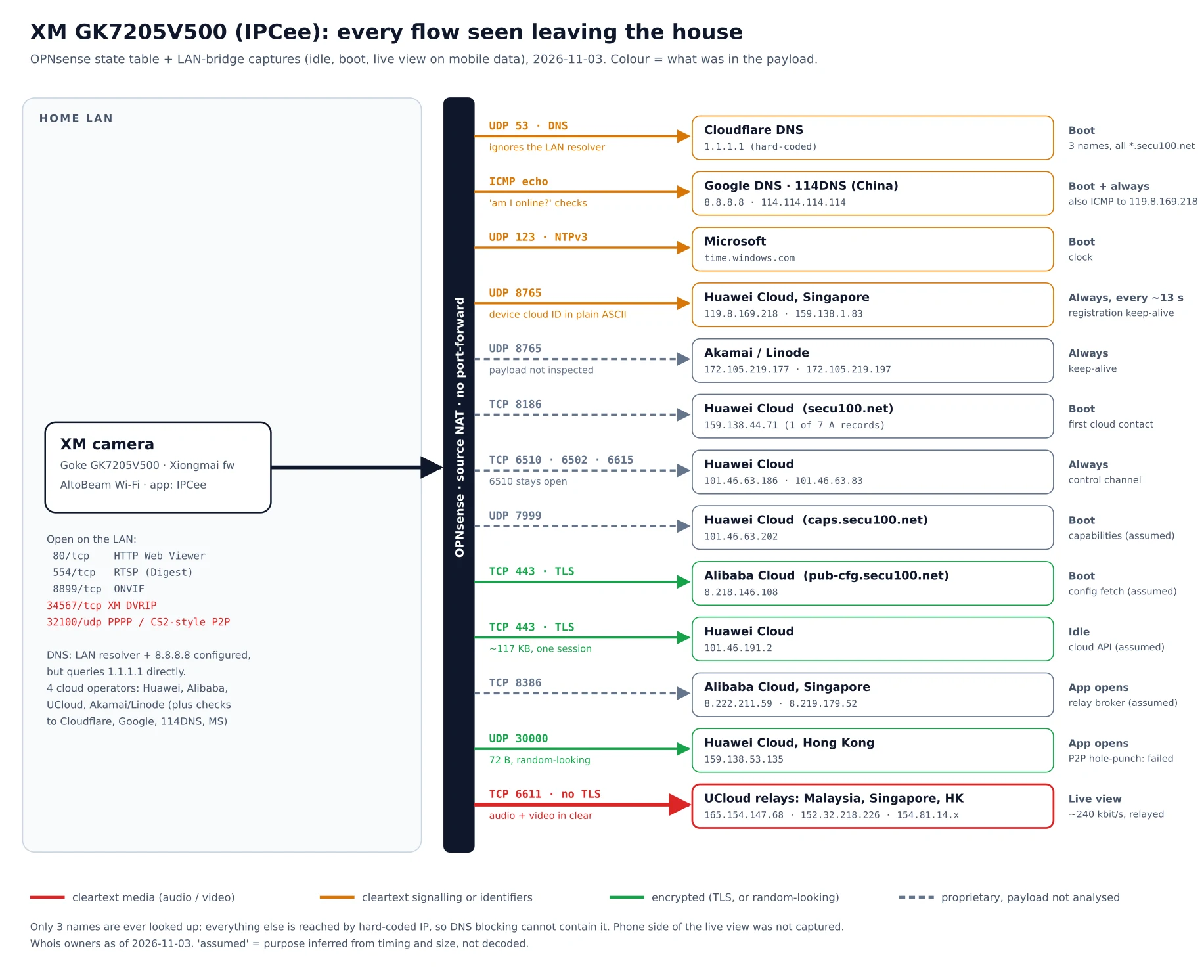
This is the diagram I wanted to draw. Each row is a destination the camera reached on its own, and the colour is what was in the payload: red for cleartext audio or video, amber for cleartext signalling or identifiers, green for encrypted, dashed grey for proprietary traffic I didn't decode.
A few things stand out before you get to the media.
It doesn't use my DNS. The camera gets the LAN resolver from DHCP and also has 8.8.8.8 configured as a second server, but in practice it sends its lookups straight to 1.1.1.1 in plain UDP. So any filtering on the LAN resolver (Pi-hole, AdGuard, Unbound blocklists) never sees them.
It barely needs DNS anyway. Across a full boot it looked up exactly three names, all under secu100.net (Xiongmai's XMEye cloud): secu100.net itself, pub-cfg.secu100.net and caps.secu100.net. Everything else, from the keep-alive servers to the relay broker, is reached by hard-coded IP. Blocking secu100.net at the resolver would leave most of the plumbing standing.
It spreads itself across four cloud operators. Huawei Cloud (Singapore, Hong Kong, and an SA-registered range) for registration and control, Alibaba Cloud for configuration and relay brokering, UCloud for the media relay, and Akamai/Linode for a second set of keep-alives. On top of that, "am I online?" ICMP pings to Google DNS and to 114DNS (a Chinese public resolver), and the clock from time.windows.com. The 114.114.114.114 ping comes first at boot, which tells you which market the defaults were written for.
It announces itself in plain text. Every ~13 seconds the camera sends a 33-byte UDP datagram to Huawei Cloud Singapore on port 8765. At offset 8 is the device's serial number in ASCII. On Xiongmai devices the serial doubles as the cloud ID, the thing the app uses to find the camera. So anyone on the path between my house and Singapore can read which camera this is, every 13 seconds, forever. (I've redacted it in the repo for exactly that reason.)
Only two flows were TLS: an HTTPS session to pub-cfg.secu100.net on Alibaba at boot, and a longer one (~117 KB) to a Huawei address while idle. My guess is configuration and cloud API calls, but I haven't decrypted them, so that stays a guess.
How a live view reaches the phone
The interesting part is what happens when I open IPCee on mobile data. The state table, sampled every 20 seconds during the session, gives the order:
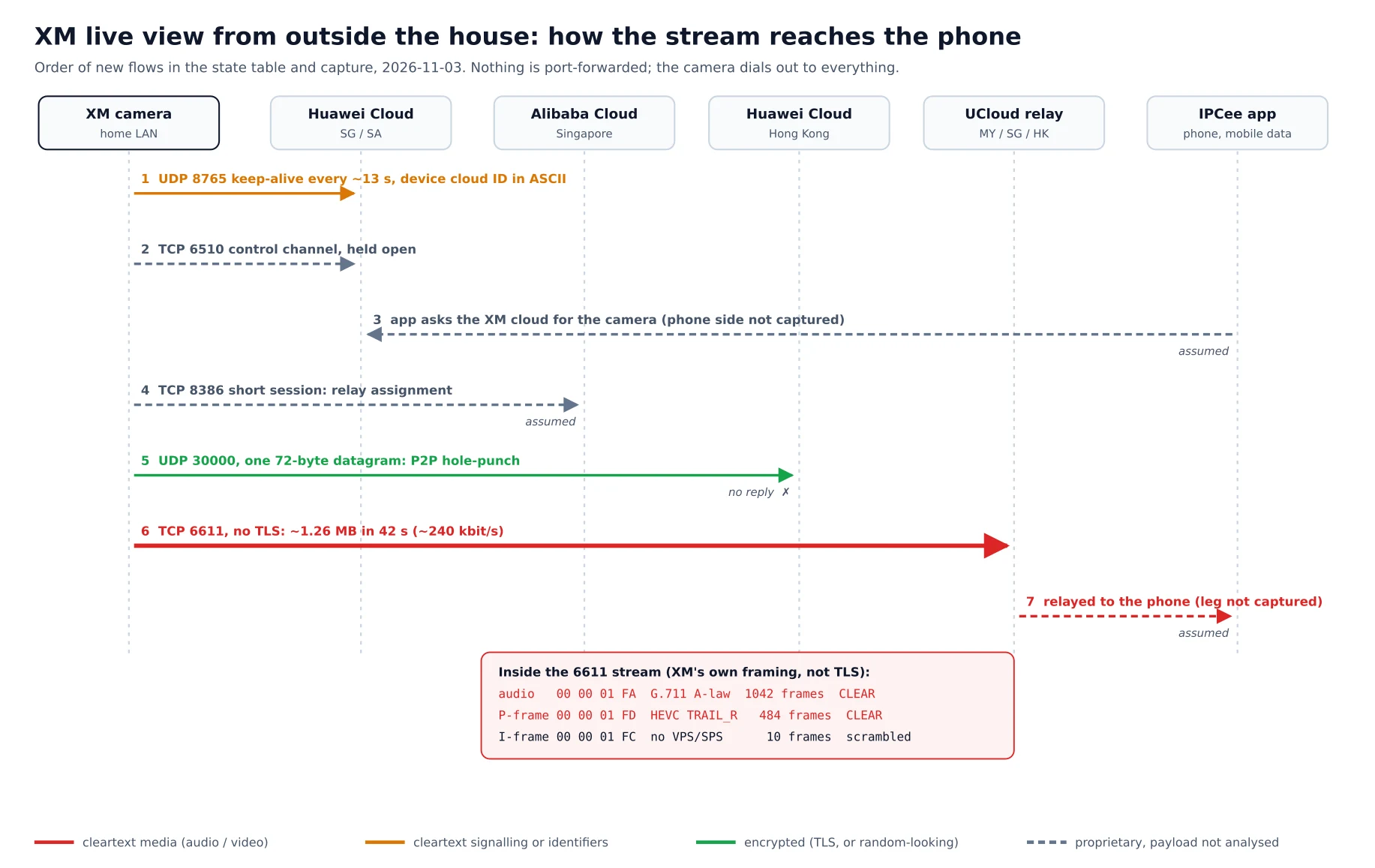
The keep-alive and the control channel (TCP 6510 to Huawei) are already up. The camera keeps them open all the time, which is what lets the cloud find it without any inbound port.
When the app asks for the camera, the camera opens a short TCP session to Alibaba Cloud Singapore on port 8386. From the timing I read that as relay assignment.
It sends one 72-byte UDP datagram to Huawei Cloud Hong Kong on port 30000. That's a P2P hole-punch attempt, and its payload does look random. It got no reply.
So it falls back to a relay: a plain TCP connection on port 6611 to UCloud, cycling through servers in Malaysia, Singapore and Hong Kong. About 1.26 MB went out in 42 seconds (roughly 240 kbit/s, so a reduced stream, not the main one).
No packet ever went to my phone's carrier IP. On this network, live view was relay-only, which means every second of it went through a third party's server.
What's inside the relay stream
This is the finding that decides the grade. Port 6611 isn't TLS. It carries Xiongmai's own media framing (the same DVRIP/NetSurveillance format the camera speaks locally), and the frame headers are readable:
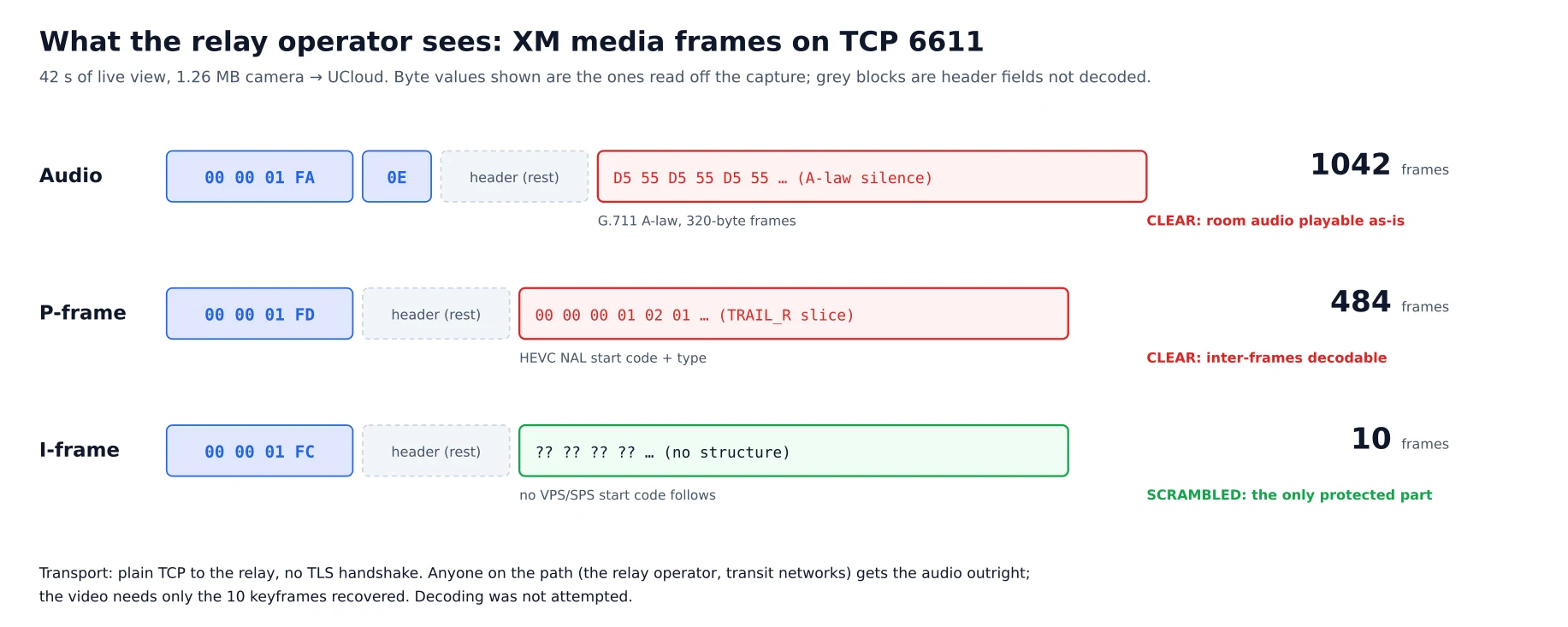
Audio (
00 00 01 FA, codec byte0E= G.711 A-law): 1,042 frames of 320 bytes in 42 seconds, raw. The runs of0x55/0xD5are A-law silence, which is about as clear a sign of unencrypted audio as you'll ever see. Room audio is playable as-is by anyone on the path.P-frames (
00 00 01 FD): 484 of them, each followed directly by an HEVC start code and a TRAIL_R slice header (00 00 00 01 02 01). The inter-frames are in the clear.I-frames (
00 00 01 FC): 10 of them, and the bytes after the header are not a VPS/SPS start code. These look scrambled or encrypted, and they're the only part of the stream that does.
So whoever runs the relay, and anyone between my house and it, gets the microphone outright. Video needs only the keyframes recovered, and with ten keyframes in 42 seconds against hundreds of plain P-frames, that's a smaller problem than it should be. I haven't tried to decode it, and I'm not claiming more than the bytes show. But "partially encrypted video, unencrypted audio, through a relay you didn't choose" is a poor default for a device whose job is to sit in a room and listen.
The good news, such as it is: the camera didn't send media when nobody was watching. In the idle snapshots there was no 6611 flow at all, only keep-alives, the control channel and the one HTTPS session.
The local attack surface
On the LAN side it listens on HTTP (80, a "Web Viewer" that wants a Windows ActiveX plug-in), RTSP (554, Digest auth), ONVIF (8899), and two that I'd rather it didn't:
TCP 34567, Xiongmai's DVRIP / NetSurveillance control protocol, the one XMEye and CMS clients use. It's historically weak and well documented: SEC Consult's 2018 research on the XMEye P2P cloud and CISA advisory ICSA-18-282-06 (CVE-2018-17915 to CVE-2018-17919) cover this platform family. I haven't tested those CVEs against this firmware, so I can't say whether they're fixed here.
UDP 32100, the port of the PPPP / CS2-style P2P family that Paul Marrapese's 2019 "Abusing P2P to hack 3 million cameras" work was about.
Telnet (23) was closed, which is an improvement on older Xiongmai firmware.
One last oddity: at some point the camera's own account changed without my doing anything. My NVR's old admin login started getting 401s on 18 October; the working account is the one set in the IPCee app. My best guess is that re-pairing in the app reset it, which is a reminder that whoever controls the app account has more say over the camera than its owner's NVR does.
The Reolink, for comparison
The Reolink E1 Pro went through the identical process, and the picture is much smaller:
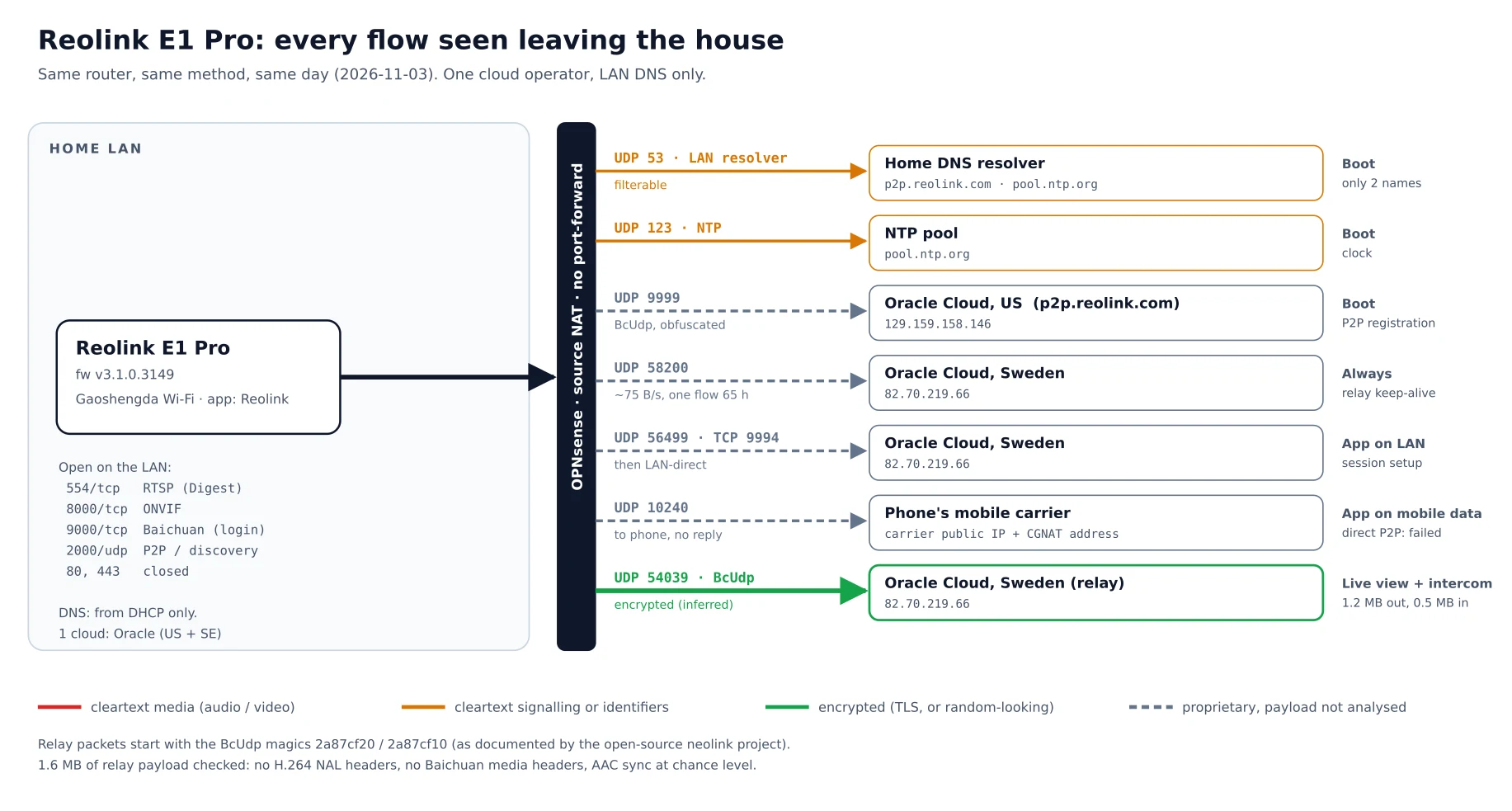
DNS goes through my resolver. It takes DNS from DHCP and looks up exactly two names at boot:
p2p.reolink.comandpool.ntp.org. That means name-based blocking would actually work on it.One cloud operator. Oracle Cloud: a US address for P2P registration (UDP 9999), and a Swedish one that holds a single long-lived UDP keep-alive (one flow had been alive for 65 hours, at about 75 bytes a second).
It tries direct first. With the app on the LAN, it did a tiny session setup through the relay, then the stream went directly over the LAN. On mobile data, it tried to hole-punch to my phone's carrier address, got nothing back (carrier NAT), and fell back to the Oracle relay in Sweden.
The relayed media shows no cleartext codec data. Entropy alone proves nothing (compressed H.264 is high-entropy too), so I checked the 1.6 MB of relay payload for markers instead. There were 101
00 00 00 01sequences, but the byte after them is mostly0x00, never an H.264 NAL type, so they're framing integers, not start codes. No Baichuan media headers, no printable strings, AAC sync words at chance level. The packets start with Reolink's "BcUdp" magic numbers, as documented by the open-source neolink project. My conclusion is that it's encrypted, and it's an inference: I haven't decoded it.
Its local surface is RTSP (Digest), ONVIF on 8000, Reolink's native Baichuan protocol on 9000 (login required) and P2P discovery on UDP 2000; HTTP and HTTPS were closed on this unit. And Reolink documents local-only use: its support pages say live view, playback and SD recording keep working without internet, and Home Assistant's Reolink integration lists the E1 Pro as tested with internet blocked.
Scoring both
To make the comparison less of a vibe, I scored both on a rubric I wrote for this (the Local-Only Security Rubric, v1, in the Network Forensics plugin). It asks two questions worth 50 points each: cut off from the internet, does it keep working? And while it's connected, what does it put at risk? Untested criteria score zero, so both grades are provisional until the post-block tests are done.
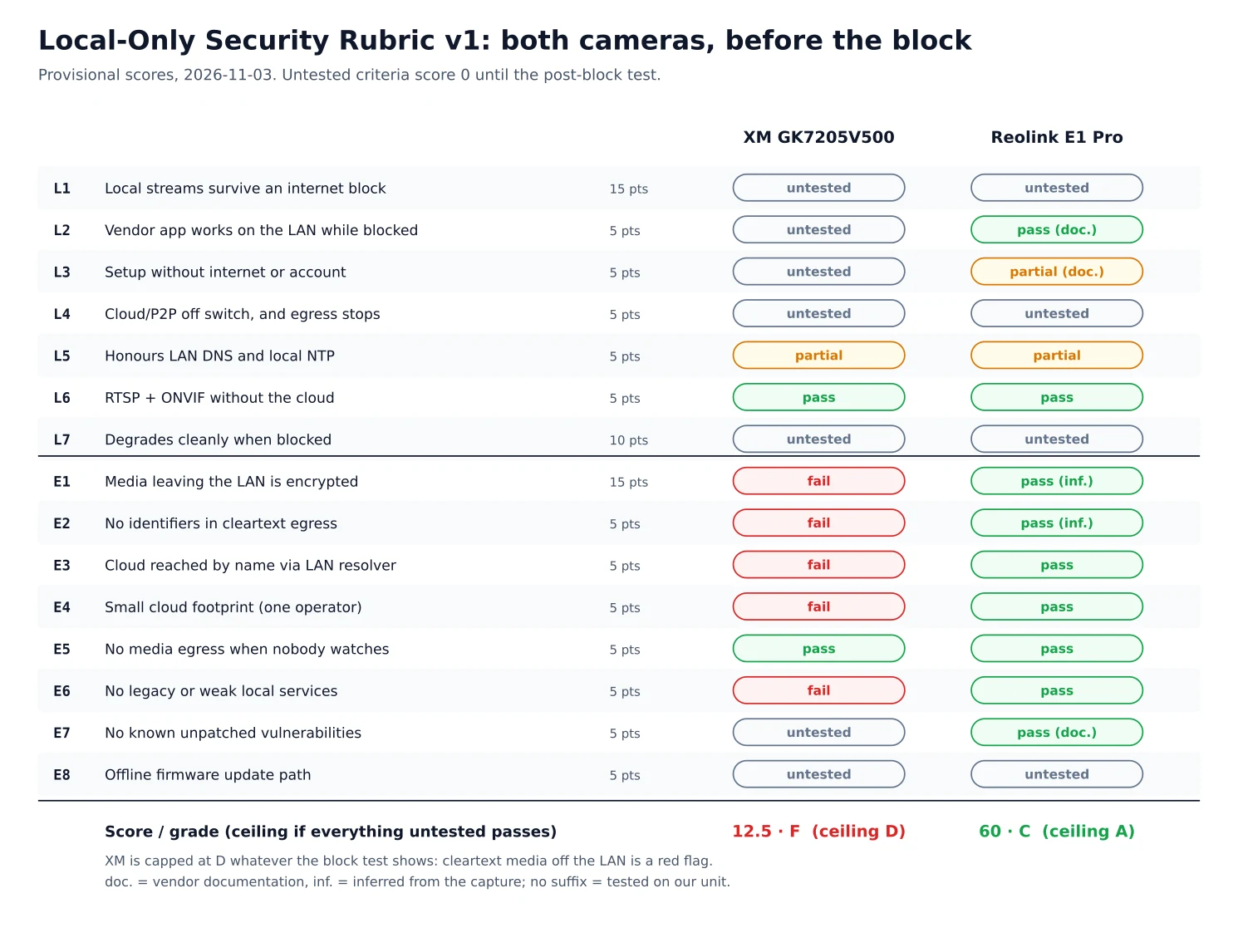
XM GK7205V500: 12.5/100, F. It fails on cleartext media, a cleartext identifier, hard-coded DNS and IPs, four cloud operators, and weak local services. Even if every untested item passes, the ceiling is a D, because cleartext media leaving the LAN is a red flag that caps the grade.
Reolink E1 Pro: 60/100, C, with a ceiling of A. Almost all of its missing points are things I haven't tested yet (does it keep streaming when blocked, does it degrade cleanly, is there an offline firmware path), not things it did wrong.
What I did about it
The XM camera is now firewalled: a pass rule to the LAN and to the router's NTP, then block-and-log for everything else, and it has since been moved onto an IoT VLAN. Three things from that are worth knowing if you're doing the same:
Block by source at the firewall, not by name. With a hard-coded resolver and hard-coded IPs, DNS blocking does almost nothing to this camera.
Kill the existing states. Established sessions survive a new rule. When I moved the camera to the new VLAN, about twenty cloud sessions (including an established relay) slipped through the VLAN's allow rule in the first moments, presumably before the alias table update took effect. Add the new IP to the block alias before the move and kill its states right after.
You can move a Xiongmai camera without the app or the cloud. Its DVRIP port, the same one I'd rather it didn't have, accepts a new SSID and static IP via
python-dvr. Check whether Wi-Fi DHCP is off first; on mine it was, so the IP lived on the camera.
The full order (pin, identify, observe, block, verify) is in the playbook in the repo, with OPNsense API calls for each step. What's still to come is the post-block verification: does RTSP keep flowing at 10 minutes, an hour, 24 hours and after a reboot while blocked, and what does the camera keep trying? That will settle the provisional grades, and I'll update the scores when it does.
The short version
The cheap camera works well as what I bought it for (a dumb RTSP source for Frigate) as long as it never sees the internet. Left to its defaults, it ignores my DNS, reaches four clouds by hard-coded address, broadcasts its cloud ID in plain text every 13 seconds, and, when I view it remotely, sends the room's audio unencrypted through a relay in another country. The Reolink isn't perfect (it still phones a relay in Sweden around the clock), but it uses my resolver, sticks to one operator, tries to go direct, and encrypts what it relays.
If you have one of these cameras, don't worry about the specific IPs above; they'll change. What matters is the order: watch first, then block at the firewall by source, then kill the states, then check it still works.
