

Every few months I redraw the same diagram. It started in April as a fairly modest plan (one MCP aggregator on a VM in the house, a second one on my desktop for the awkward cases, and a little HTTP service for shuffling files around), and it has been redrawn four times since. I keep the whole history in a public repository, partly out of habit and partly because I find it useful to see which of my confident decisions survived contact with reality.
Version five went up today. It's the first one where the thing at the centre of the drawing isn't an MCP server.
The short history of a moving target
For anyone who hasn't followed along: MCP (the Model Context Protocol) is the plumbing that lets an AI agent call tools, whether that's sending an email, reading a calendar or turning off a light. I wanted all of those tools in one place, reachable from any device and (eventually) any AI client, rather than reconfigured per app and per machine.
The first versions were about aggregation. One gateway, lots of servers behind it, one address to point clients at. The desktop aggregator got dropped in v2 ("one less layer" turned out to be the right call). Version three moved everything owned onto a Tailscale mesh and added a "skill server" (OpenViking) so that procedures could be retrieved on demand. Version four federated a small gateway at a second site, so a light switch on another continent became one more upstream.
All sensible. All MCP-shaped.
What changed: the skills overtook the servers
What I didn't anticipate was how quickly Agent Skills would eat the use case.
A skill is just a folder with a SKILL.md file in it: instructions, conventions and the sequence of steps for doing a thing "the way we do it here". Claude Code bundles them into plugins, and plugins live in marketplaces (which are just git repositories). I now have about 275 plugins across six marketplaces, comprising roughly 3,650 skills, commands and agents. That's not a typo, and no, I didn't write all of them by hand.
Here's the uncomfortable realisation. Most of my MCP servers were worse than a skill plus a command-line tool the model already knows. An agent doesn't need a bespoke S3 server when it knows aws and rclone cold; what it needs is a skill that says which bucket, which account, and which trap I fell into last time. So the default flipped. A new capability is now a skill that assumes a well-known CLI is installed, with keys injected from a secrets manager at run time.
MCP servers survive only where they earn it:
The client can't run a shell, as with hosted chat apps.
The thing lives on the home network or keeps a session: home automation, a label printer, a WhatsApp session.
The credential shouldn't sit on the client.
It's one of my own services with no CLI: memory, a notebook, an inventory system.
It shapes a large, awkward response that would otherwise get dumped raw into the context.
The first pass at applying that rule retired about a dozen upstreams. I didn't miss any of them.
One index for skills and tools
So what does an agent actually search, if not a list of servers? That's the centrepiece of v5.
OpenViking was retired on 10 October and replaced by a small, purpose-built "plugin catalogue". It clones the marketplaces, re-syncs them every hour, and indexes everything with a mix of keyword ranking (BM25) and bge-m3 embeddings: local first, with an identical hosted model as the fallback. There's no LLM summarising anything, so it costs roughly nothing to run (a full re-embed comes to about two US cents).
The bit I'm happiest with is that tools are records in the same index. When an agent asks "how do I do X here?", one search returns the relevant skill and a short list of gateway tools, each with the exact way to call it. Reading a tool returns its schema. Each skill also records which tools it mentions, so when I retire a server I can find the skills that would quietly break.
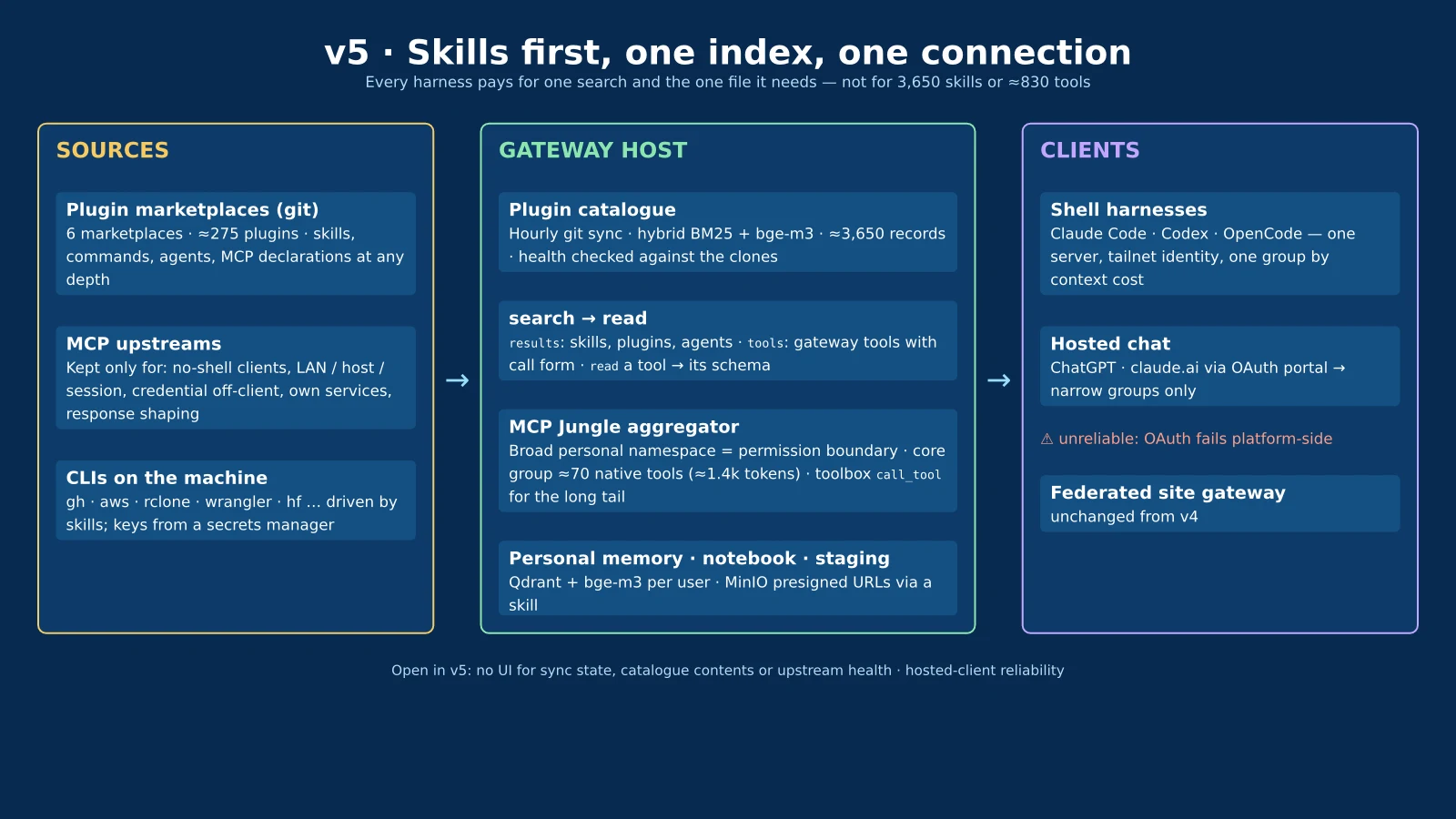
That matters because context is the real currency. A broad namespace of around 930 tools cost about 20,000 tokens of tool names in every single session, measured rather than guessed, before the agent had done anything. Clients now preload about 70 tools (around 1,400 tokens), chosen because they were used in five or more sessions. Everything else is one catalogue lookup away. A scan of 1,721 sessions said the top 150 tools covered 92.5% of real use, which made the decision fairly easy.
The rule for every harness I use (Claude Code, Codex, OpenCode) is now the same three lines: one server, one credential, search the catalogue first.
What still doesn't work
Two things, and I'd rather be honest about both. Does it count as a gateway "for every client" if one of the clients can't connect?
The first is hosted clients. ChatGPT reaches the gateway through a Cloudflare OAuth portal pointed only at narrow, purpose-built groups, and on paper that's tidy. In practice the connection fails more often than it works. Public reports put the fault on the platform side ("OAuth state not found", or the client insisting the server "does not implement OAuth" without ever having asked it), and claude.ai has its own long-open token bug. Moving the gateway to a cloud VPS (which I considered, since the only reason it's at home is Home Assistant and a few LAN devices) wouldn't fix any of that.
The second is that there's no UI. None. If I want to know when the catalogue last synced, which skills it's exposing, or which upstreams are healthy, I ask an agent to call a health tool. That's lovely for agents and slightly absurd for a human.
The skills gap
So I went looking for a project with the right shape, on the reasonable assumption that somebody must have built this already. The survey covered roughly twenty MCP gateways, a dozen skills registries, a dozen chat UIs and about twenty "integration-first" SaaS products.
What I found is two product categories, and my setup is neither.
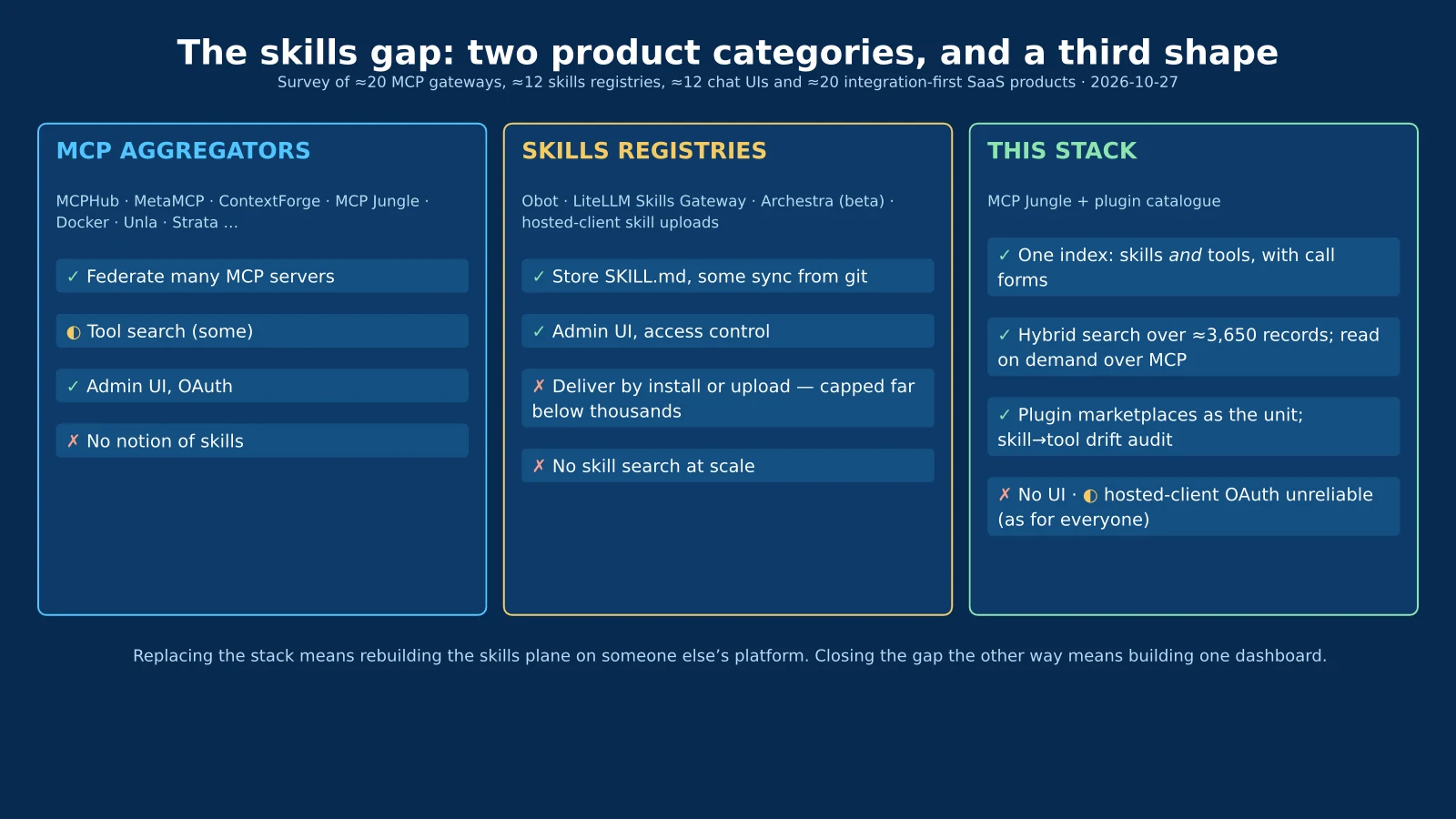
The first category is the MCP aggregator: MCPHub, MetaMCP, IBM's ContextForge, MCP Jungle (which I use), Docker's gateway and so on. Many of them are good, several have nice dashboards and tool search, and none of them has any notion of a skill.
The second category is the skills registry: Obot, LiteLLM's Skills Gateway, Archestra (in beta), plus the skill uploads built into claude.ai and ChatGPT. They store SKILL.md folders, some sync from git, some have proper admin UIs. But they deliver skills by installing them, and the hosted clients cap that far below anything like 3,650: claude.ai org skills reportedly top out around 50, the Claude API takes 20 per request, and Codex budgets about 2% of the context for its skill list. Nobody I found does search across thousands of skills, and nobody indexes skills and tools together.
That's the gap. The field is ahead of me on exactly two things: a dashboard, and turnkey OAuth that (as above) doesn't reliably work for anyone. Everything that makes the setup useful lives in the skills plane, which means replacing it would mean rebuilding that plane on someone else's platform.
There is one encouraging development. MCP now has an official Skills extension (SEP-2640, finalised in September), which serves skills as skill:// resources. It defines listing rather than search, but it's a standard a catalogue like mine could speak alongside its own search, so that clients which adopt it could import from it.
Where this goes next
The plan for the next round is modest: a self-hosted chat UI that can connect with a plain bearer header (LibreChat and Open WebUI both can, and both understand SKILL.md natively), a small dashboard over the catalogue's health, and support for the Skills extension. Plus a time-boxed trial of Obot and LiteLLM, to settle build versus buy properly rather than by instinct.
If you're building something similar, the full write-up, both diagrams and the four earlier iterations are in the repository: https://github.com/danielrosehill/MCP-Deployment-Architecture. And if you know of a project that does serve skills and tools as one searchable index over MCP, I would very much like to hear about it, because I've looked, and I'd happily stop maintaining my own.
GitHub Repository danielrosehill/MCP-Deployment-Architecture MCP architectural deployment notes, periodically updated TypstUpdated Oct 2026 mcpmcp-gatewaymodel-context-protocol View on GitHub