
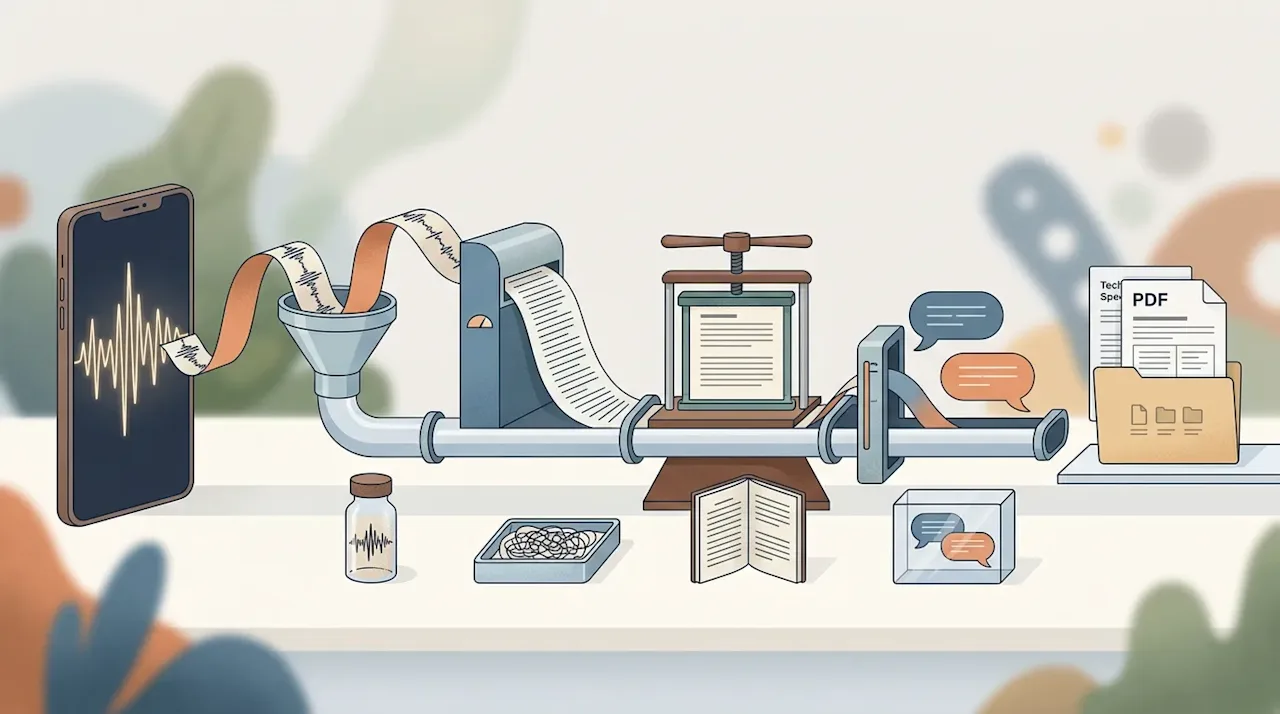
Today I recorded a 22-minute voice note about transcription, which is a slightly circular thing to do. The note was a spec for a plugin that turns voice notes into documents, and the first job that plugin did, once it existed, was transcribe the note that described it.
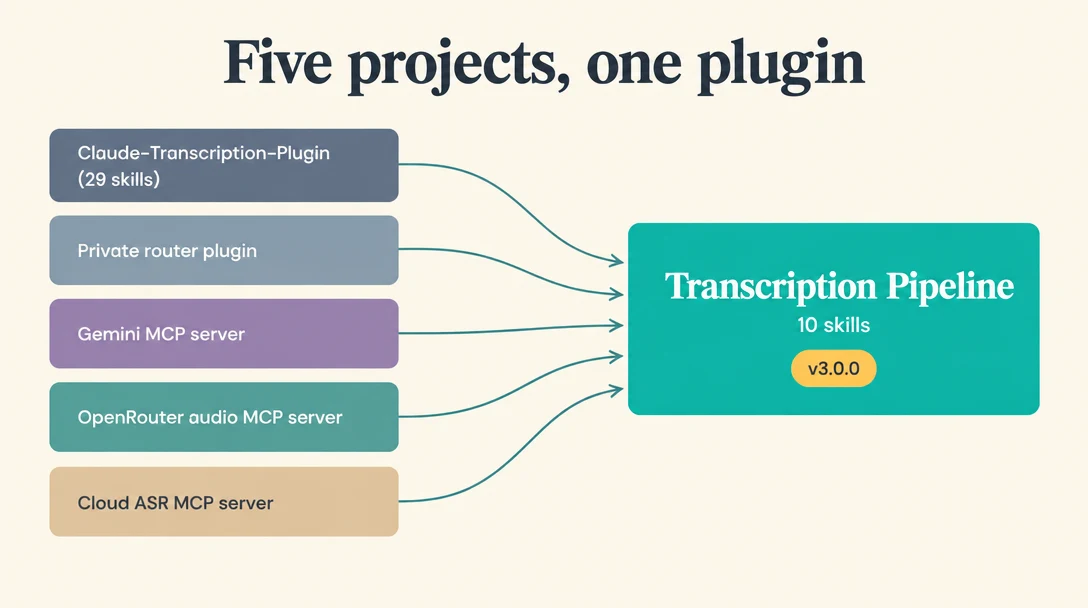
The plugin is Transcription Pipeline, a set of agent skills (packaged as a Claude Code plugin, but readable by any agent that understands SKILL.md files) that takes a recording from wherever it lives and turns it into something usable: a cleaned transcript, a development spec, meeting minutes, a typeset PDF. It's public and MIT-licensed, and it replaces about five earlier projects of mine that all did some part of the same job.
Five projects doing one job
Transcription is one of those things I keep building tools for, because I use it constantly. Most of what I write starts as speech, and a lot of my project planning starts as a long voice note recorded on my phone and dropped into a Google Drive folder.
Over time that produced a small pile of plumbing. There was a public Claude Code plugin (Claude-Transcription-Plugin, which had grown to 29 skills), a private router plugin with my own backends baked in, and three MCP servers: one for Gemini, one for OpenRouter's audio models, and a work-in-progress one for cloud ASR more generally. Each was reasonable when I made it. Together they were five places to look whenever I wanted to transcribe something, each with a slightly different idea of where files go and what comes back.
GitHub Repository danielrosehill/Claude-Transcription-Plugin Claude Code plugin: audio transcription workflow — denoise, VAD, transcribe (Gemini/AssemblyAI/Whisper), clean, structure, export, with cloud and local engine backends. ★ 1PythonMITUpdated Nov 2026 View on GitHubSo the voice note was my attempt to iron out every edge case I'd hit across those projects and fold them into one plugin, divided into the stages I actually follow every time I do this. The 29 skills became 10. The old plugin's marketplace name, transcription-pipeline, moved over to the new repository, so anyone who had the old one installed gets the successor (version 3.0.0) on update.
Why I dropped the MCP servers
The more interesting decision was dropping MCP altogether, at least for this.
When I built those servers, the idea was to give agents a "transcription tool". As plugins have matured (and as the way I use them has changed), I've come round to the view that a plugin which ships a script and says, in effect, "call the API with the key in the environment" does the same job with less to run. There's no server to keep alive, and nothing to configure per client.
There were also two practical problems that pushed me there. For about a year I've been routing my agents through a single AI gateway on a home server, so that every client gets the same tools from one connection. Transcription was one of the first things to break under that model, because a tool running on the server can't see a file sitting on my laptop. I'd record 45 minutes in Audacity, save it locally, ask for a transcript, and the agent would (quite correctly) point out that it had no way of getting the audio to the API. My workaround was a staging bucket with an expiry policy: upload the file, hand the tool a link, let the bucket clean up after itself. It works (and it's still documented in the retrieval skill for anyone in the same situation), but it's a workaround — for a problem the architecture itself created.
The other route — pushing the audio through the tool call itself as base64 — is worse. It bloats the context and, on long recordings, it simply failed.
A script that runs where the file is, with an API key in the environment, has neither problem.
The stages
The plugin follows the sequence I use whenever I transcribe something, with one skill per stage and a run-pipeline skill that strings them together:
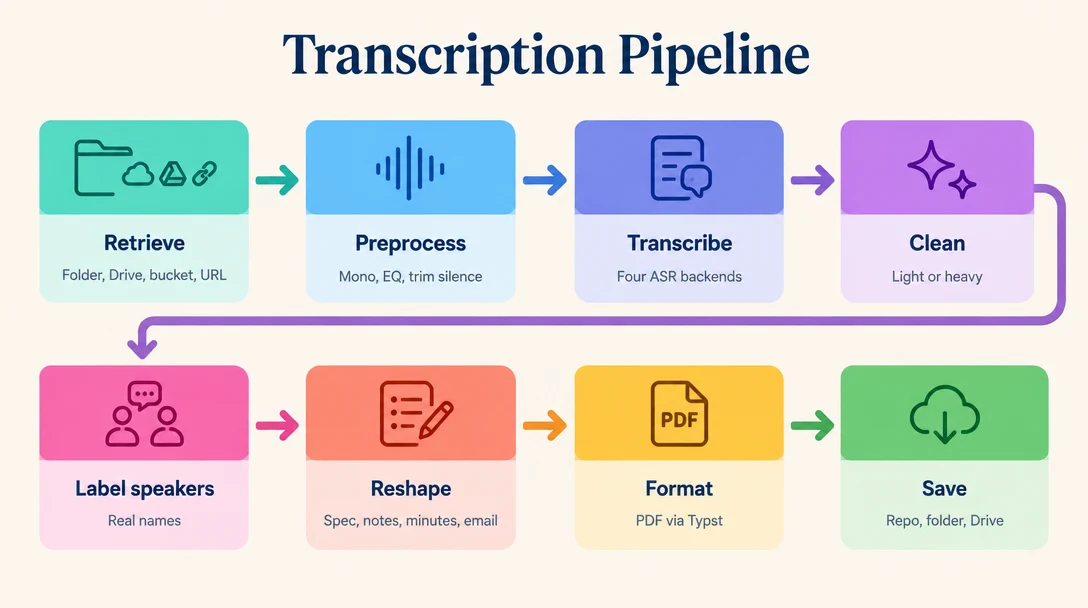
Retrieval fetches the newest recording from a local folder, a Google Drive folder, an S3-compatible bucket or a URL (including video URLs, via yt-dlp). Preprocessing is optional but usually worth it: downmixing to mono 16 kHz, an EQ preset, denoise when the audio is really noisy, and silence trimming. The trimming is deliberately conservative. In the voice note I described the failure mode as over-aggressive voice activity detection eating context, so the default only acts on gaps of six seconds or more, and shortens them to half a second.
Transcription goes to one of four backends, each verified working on 2 November 2026:
OpenRouter, with
~google/gemini-flash-latestas the default (which resolved to Gemini 3.8 Flash that day)AssemblyAI (universal-2, with SRT timestamps and speaker labels)
Gemini directly, through its Files API
a local OpenAI-compatible server, in my case Parakeet running at home
The OpenRouter default is a dynamic alias on purpose. Flash is cheap and more than good enough for everyday transcription, and pointing at "latest" means I don't have to edit anything when Google ships a new one. AssemblyAI remains my choice for long recordings: it's timestamped, built for exactly this, and affordable.
After that come the text stages. Cleanup comes in two strengths. Light removes disfluencies and self-corrections and adds paragraph breaks. Heavy also adds headings, removes clear repetition, and corrects what look like ASR mistakes (with inline markers, so every guess can be checked). Speaker labelling turns "Speaker A" and "Speaker B" into real names, worked out from what's said, from a description of the voices, or from short clips I listen to and identify. Reshaping turns the cleaned text into whatever the recording was for: a dev spec, notes, a summary, minutes, a to-do list, an email, a blog outline or post, or a template of your own. Formatting typesets the result as a PDF with Typst, either as a clean document or as a conversation with speech bubbles. Saving puts it in the repo, a folder, Drive or a bucket.
Keep every artefact
One rule runs through all of it: nothing is thrown away and nothing is overwritten. A run leaves raw.txt and raw.srt exactly as the ASR returned them, a clean.md, one file per reshape, the PDF, and a meta.json recording which model actually ran, how long it took and what it cost.
The raw transcript is almost never what I want to work with. I keep it anyway. It's text, it weighs nothing, and when the cleaned or reshaped version says something surprising, the raw one is how you find out whether the speaker said it or a model invented it.
Preferences that live outside the plugin
The part I've thought about most isn't transcription at all. It's the problem of shipping a public plugin that people (me included) can adapt.
I used to keep parallel private plugins with my own folders, servers and model choices baked in, next to the public versions. That's tedious, so these days I'd rather publish one plugin and adapt it. The obvious way to adapt it is to have the agent rewrite the shipped skills to fit your environment, and that's exactly where it goes wrong: the moment the agent faithfully rewrites the skills, you're running your own fork, and the next update I ship conflicts with it. (As far as I know there's still no agreed blueprint for this, which is part of why I keep circling it.)
What I do instead is keep preferences in a plain Markdown file outside the plugin, by default at ~/.claude-user-data/transcription-pipeline/preferences.md. The setup skill writes it: your Drive folder links (I paste in "this is where my development voice notes go, this is where general notes go"), favourite OpenRouter models as numbered slots with notes on when to use each, any local ASR server, an EQ preset, speaker names and save targets. Your own EQ presets, reshape templates and Typst layouts go in the same folder and take precedence over the shipped ones.
Why Markdown on disk rather than the agent's own memory? Because a plugin that keeps its settings in one vendor's proprietary memory isn't much use to someone running a different agent. A text file can be read by any of them, and edited by hand.
What I actually use it for
The two cases I described in the voice note cover most of my use.
The first is the development brief. I record a voice note about something I want built, and it goes through transcription, light cleanup and a reshape into a spec, with all three files (raw, cleaned, spec) saved into the repository. This plugin is its own first example. The original idea recording sits in the repo, next to the raw transcript, the cleaned version and the spec the plugin was built from.
The second is a long family call, the kind where a lot gets said and a few things get decided (which school to choose for our child, say). That goes to AssemblyAI for the transcript, through speaker labelling so "Speaker A" becomes a name, then light cleanup and no more, and then into minutes: the key decisions rather than the whole verbatim discussion, typeset as a PDF and saved to Google Drive. Alongside the PDF go the raw transcript and a downsampled copy of the audio. I don't expect to open either. They're an audit trail, so that if anyone ever says "that's not what I said", the original recording and the untouched transcript are right there next to the minutes. In a business setting I'd call that compliance. At home it's just good practice.
Installing it
In Claude Code:
/plugin marketplace add danielrosehill/Claude-Code-Plugins
/plugin install transcription-pipeline@danielrosehill
Then say "set up transcription" and the setup skill writes your preferences file and checks your keys. You'll need ffmpeg, uv, and at least one of OPENROUTER_API_KEY, ASSEMBLYAI_API_KEY or GEMINI_API_KEY (or a local ASR server instead of a key). Typst is needed for PDFs and yt-dlp for video URLs. Outside Claude Code, the skills are plain SKILL.md files and the three scripts are uv single-file scripts that print JSON, so any agent can drive them.
What's next
A few honest caveats. Nobody (me included) has measured whether the EQ presets or bitrate changes improve accuracy, so the EQ is there for clarity and off by default. An earlier denoise test showed only a five- or six-word difference on two minutes of speech over a crying baby, so denoise is opt-in for audio that really needs it. And the old Gemini MCP server is now marked end of life, with the other projects pointing to the new repository. docs/prior-art.md lists what came over from each of them, what didn't, and why.
What I'm happiest with is the shape. One plugin, one preferences file, eight stages, and a folder full of artefacts at the end, starting with the voice note that described it. If you've solved the problem of letting people customise a public plugin without forking it, I'd like to hear how, because the Markdown file is the best answer I have so far.
If you're curious about the earlier thinking, I've written about the skills-first redesign of my AI gateway, about how much bitrate an audio-multimodal model actually needs, and about turning a 42-minute voice note into a vote decision.
