
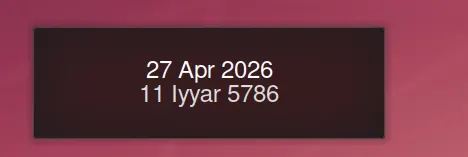
One of the small frictions of running Linux in Israel is that the desktop doesn't really know the Hebrew date exists. macOS will surface it (begrudgingly, somewhere). iOS will let you bolt it on. KDE Plasma — the desktop I've otherwise come to love — has a perfectly good calendar applet that displays a perfectly singular kind of date: the English one (or, more pedantically, the Gregorian one, but nobody outside a calendar reform paper actually calls it that).
For a long time I lived with this, in the way one lives with most small frictions: by not really thinking about it, and occasionally muttering. Then a few weeks ago I sat down to fix it.
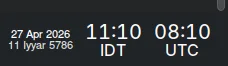
The result is a small KDE Plasma 6 plasmoid that displays both dates side by side — by default stacked on two lines, sized to live unobtrusively in the system tray between the clock and the notification area. (Horizontal real estate in a tray is precious; nothing irritates me more than a "small" widget that turns out to be the size of a postage stamp.)
The sunset problem
Anyone who has tried to display a Hebrew date programmatically discovers, fairly quickly, that the Hebrew calendar does not respect midnight. The day flips at sundown — shkiah — which means a widget that just runs a conversion against today's date will be wrong for several hours every evening, and the hours during which it's wrong depend on where you happen to be standing on the planet.
The fix is conceptually simple and mildly annoying in practice: you need the user's location, you need a sunset time for that location, and you need to flip the displayed date about thirty seconds after sunset. The widget asks for a city and a latitude/longitude pair, hands those to the (excellent, free) Hebcal API, caches the day's sunset time, and then schedules exactly two updates per day — one at midnight, one just after sundown. No polling, no per-minute timers, no chewing through battery for a date that changes twice in twenty-four hours.
What you can configure
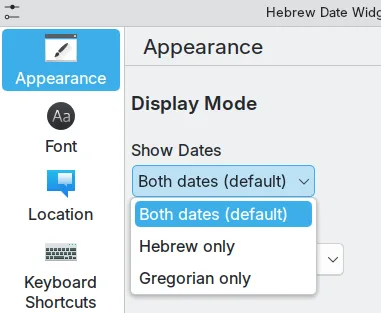
The configuration menu is the part that actually took the longest, because the moment you give people three Hebrew date formats, somebody is going to want a fourth.
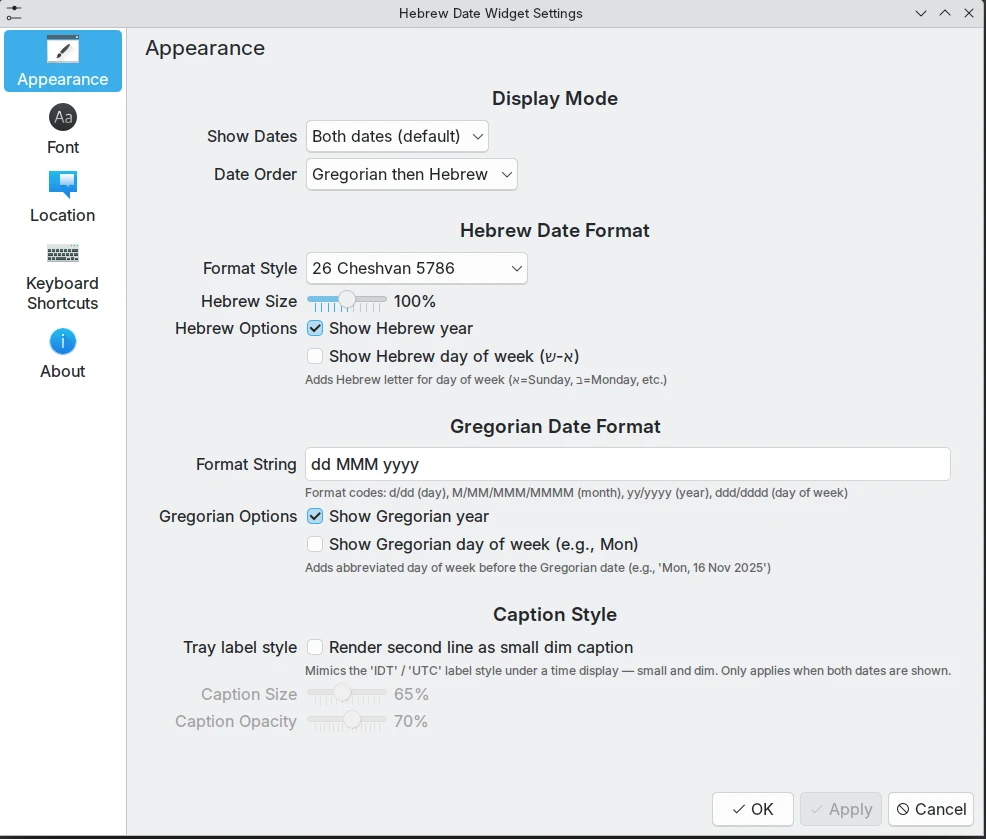
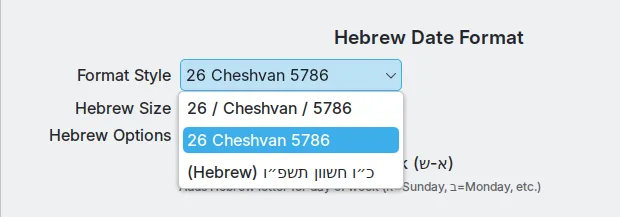
The Hebrew date can be rendered three ways: 26 / Cheshvan / 5786 with slashes, 26 Cheshvan 5786 plain, or כ״ו חשון תשפ״ו in Hebrew characters with the proper gershayim. (Diacritics will come later, perhaps, if anyone asks.) You can show one date or both. You can put the Hebrew first or the English first. You can scale the Hebrew line independently of the English one, between fifty and a hundred and fifty per cent — useful because Hebrew letterforms tend to optically read smaller than Latin ones at the same point size.
There are separate font-size controls for desktop placement and panel placement, with an auto-sizing toggle that picks sensible defaults based on where you've dropped the widget. There's a "caption style" that mimics the small-and-dim secondary line you see under KDE's own clock when it shows a second timezone (handy if you want the widget to look native).
Installing it
The repository is at github.com/danielrosehill/Hebrew-Date-KDE-Widget. It's MIT-licensed and assumes a setup roughly like mine — Ubuntu and KDE Plasma 6 on Wayland, though it should work on any Plasma 6 environment.
danielrosehill/Hebrew-Date-KDE-Widget View on GitHubClone and run the install script:
git clone https://github.com/danielrosehill/Hebrew-Date-KDE-Widget.git
cd Hebrew-Date-KDE-Widget
./install.sh
Or, if you'd rather see what's happening, the manual version:
kpackagetool6 --type Plasma/Applet --install package
kquitapp6 plasmashell && kstart plasmashell
Then right-click your panel or desktop, choose "Add Widgets", search for "Hebrew Date Widget", and drag it where you want it.
There's also an optional ./install-fonts.sh that pulls a small curated set of Hebrew and Latin display faces from the official Google Fonts repo (Rubik, Heebo, Cardo, Suez One, and a few others) into ~/.local/share/fonts/. The widget's font picker reads from your system font list, so anything installed there will appear.
Why bother
A widget that displays the Hebrew date is not, by any reasonable metric, an important piece of software. The world will not notice if it exists or if it doesn't. But there's something to be said for desktops that quietly acknowledge where you live and what calendar you keep — and there's something a little corrosive about always having to remember it yourself, against the grain of the operating system, as if the Hebrew date were a private piece of information rather than the actual date in half the country.
So: a small fix for a small frustration. If you're on KDE and you want it, it's there.
